It’s the last week of the month. Your team just wrapped a big project, and you are trying to finalize payroll and prep for next week’s board meeting, all while closing the books.
You open three browser tabs: bank feeds, expense reports, and the payroll platform. The numbers don’t match. The client’s invoice was paid late. One of the new contractors did not submit their timesheet. Your controller is offline, and your finance stack suddenly feels like a pile of puzzle pieces.
This is what month-end often looks like when growing firms rely on partially manual workflows. Even teams with solid accounting software hit delays. This is usually not because the work is hard, but because the data lives in too many places and moves too slowly.
Speeding up your close isn’t just about working faster. It’s about reducing friction in the right places, so your team can close with confidence. This article breaks down where the delays usually happen, how to fix them, and what a faster, cleaner close actually looks like.
Why Book Closings Often Drag On

Month-end deadlines feel simple on paper. But in practice, the process slows down when information arrives late or the tools in place don’t interact with each other.
Even experienced teams lose hours chasing down numbers that should have been there from the start. Below are some of the most common reasons why your close might keep getting pushed out.
Manual Data Entry and Reconciliation Bottlenecks
Copying transactions by hand leaves too much room for delay and error. Every manual input requires time to enter, time to double-check, and time to fix if something does not match. According to the CFO, over 50% of finance teams still take more than a week to close their books, often because manual reconciliation slows everything down.
Bank feeds can help, but they do not eliminate the problem when expenses, card transactions, and vendor payments all come through different systems. If one charge is missing or misclassified, the entire reconciliation process is delayed. And when spreadsheets get involved, version control issues add another layer of complexity.
Even small teams with solid accounting tools can lose days to rework caused by manual entry. The longer this cycle continues, the harder it becomes to close books on time without cutting corners.
Overlapping Responsibilities Across Teams
When no one knows who owns what, the close process slows down. A report gets flagged for review, but no one follows up. A missing receipt is noticed, but no one takes action. These gaps happen when responsibilities are spread across finance, operations, and department leads without clear rules.
If your bookkeeper is waiting on a manager to approve a vendor bill, but that manager is also tracking down project hours for payroll, both tasks stall. And once multiple people are involved in the same process without defined handoffs, things fall through the cracks.
Overlapping duties can also lead to duplicated work. Two people pull the same report, apply different filters, and end up with different numbers. Now the close includes time spent reconciling internal discrepancies.
Teams working with us at System Six often resolve this by documenting clear handoffs across finance, operations, and leadership. When roles are mapped early and reinforced weekly, fewer tasks fall through the cracks.
Missing or Delayed Supporting Documents
You might have the transactions, but not the context. A payment goes through without a matching invoice. Without the right documents in place, the final review halts until someone fills in the gap.
As per the AIN survey, finance teams chase missing receipts weekly for one in three employees. These gaps turn into bottlenecks when approvals, clarifications, or uploads fall outside the standard process. Waiting for others to respond, especially when finance has to manually follow up, can delay the close by days.
Even cloud storage doesn’t solve the issue if there’s no clear process for uploading, naming, or organizing files. When supporting documents are scattered or incomplete, finance teams have no choice but to chase them down before signing off.
Building a Step-by-Step Close Timeline

Most delays during the month-end happen because steps are either missed or done out of order. A close timeline gives your team structure and helps you avoid late adjustments, duplicated work, or rushed approvals.
Instead of relying on memory or scattered to-do lists, a structured timeline outlines who does what and when. This removes guesswork and lets your team build a rhythm across departments.
Here’s how a close timeline often takes shape:
- Day 1–2: Capture all transactions. Bring in all financial data from your connected systems. This includes credit card transactions, vendor payments, payroll, employee reimbursements, and incoming revenue. Early collection helps identify gaps and prevents the review from stalling later.
- Day 3: Finalize expense submissions and approvals. Ensure every department has submitted their expenses and uploaded the required documentation. Check that approvals are complete for all submitted entries. Missing receipts, delayed uploads, or unapproved reimbursements should be flagged now and not at the review stage.
- Day 4: Reconcile accounts. Match each transaction against your bank and credit card statements. Look for unreconciled items such as duplicate entries, uncategorized payments, or uncleared deposits. Pay extra attention to high-volume categories like operating expenses and payroll.
- Day 5: Review key reports. Generate your core financial reports: profit and loss, balance sheet, and cash flow. Review these carefully for accuracy. Check for misclassifications, missing entries, or variances from prior periods that may need clarification.
- Day 6: Address adjustments and finalize entries. Make any required accruals, deferrals, or reclassifications. If adjustments are needed, document the reason and review them with the appropriate team member. Confirm that all journal entries are correctly posted and audit-ready.
- Day 7: Final review and close. Conduct a final review with all stakeholders. Once everything checks out, close the books for the period. Generate management or board-level reports and ensure your dashboards reflect the final data.
Streamlining Data Collection and Approvals

One of the biggest delays during close happens before the review even begins. If your team spends the first few days chasing missing receipts or unapproved entries, the close loses momentum before it starts. Streamlining how you gather and approve data can speed things up without risking accuracy.
Improved data flow starts with reducing the number of systems your team needs to touch. When receipts, invoices, and reports move through centralized channels, each entry arrives with fewer errors and less back-and-forth. Approval chains also move faster when roles are clearly assigned and automated routing keeps tasks from stalling.
Connected systems reduce friction across departments. When expense tools feed directly into your accounting software, your team avoids duplicate entry and gets a real-time view of progress. The fewer handoffs involved, the fewer blockers you need to clear during close.
Modern cards with built-in policy controls can also help. Transactions are automatically categorized, and receipts can be captured at the point of spend. This reduces the need for follow-ups and gives you cleaner data from the start.
For recurring workflows like payroll or bill payments, pre-scheduled review checkpoints keep things moving. When everyone knows their part and sees the same information, approvals become routine instead of reactive.
Leveraging Automation Tools for Speed and Consistency
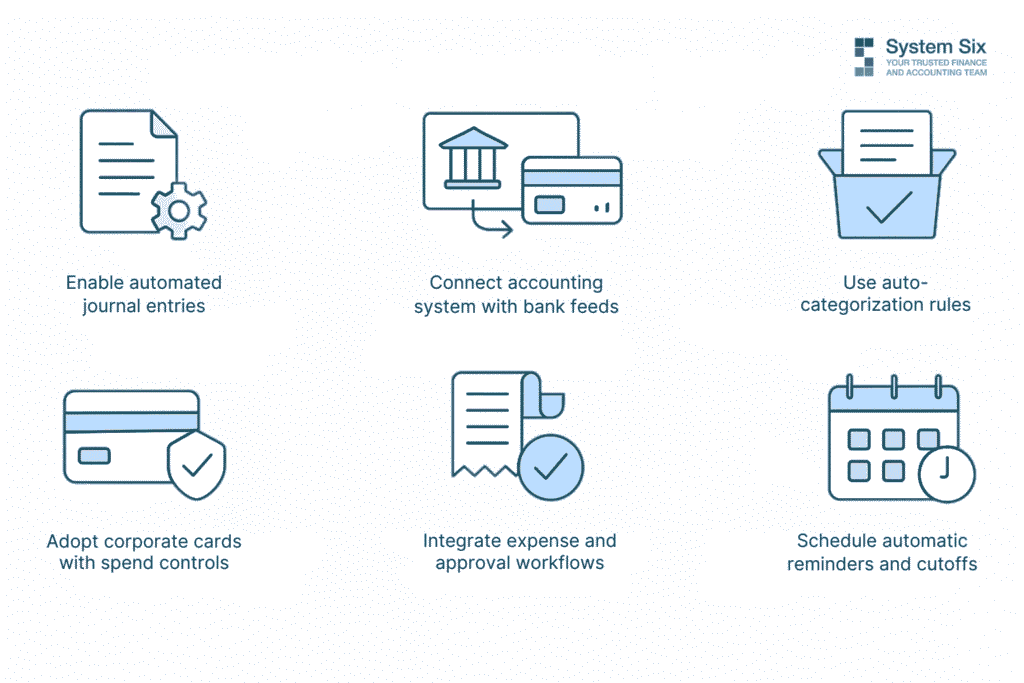
Leveraging automation tools means using software that completes repetitive tasks without manual input. Instead of entering transactions line by line or emailing for approvals, your systems handle those steps for you. This not only saves time but also reduces the risk of human error. Some companies using finance automation platforms are able to cut their monthly close time by 15 days.
Automation helps you collect cleaner data, process entries faster, and maintain consistent processes across each close. You spend less time fixing mistakes and more time reviewing accurate information.
Here are a few practical ways to use automation to your advantage:
- Enable automated journal entries for recurring transactions. Monthly items like rent, payroll, depreciation, and loan payments can be recorded automatically. This keeps your ledger current without manual re-entry and lowers the risk of missing important entries.
- Connect your accounting system with real-time bank feeds. When bank and credit card transactions sync daily, your books stay up to date. You avoid delays caused by batch imports or outdated statements, and reconciliation becomes faster and more accurate.
- Use auto-categorization rules to reduce coding errors. Set rules that classify expenses based on vendor, amount, or account type. This reduces misclassifications and helps new team members follow consistent coding practices.
- Adopt corporate cards with built-in spend controls. Cards that enforce policy at the point of purchase help limit out-of-policy spend. When rules are built into the card, you receive cleaner data that requires fewer corrections during review.
- Integrate expense and approval workflows into one platform. When employees submit receipts, request reimbursements, and get approvals in the same system, everything stays connected. This creates a full audit trail and reduces the risk of missing documentation.
- Schedule automatic reminders and cutoffs. Use your systems to send reminders before deadlines and close submission windows on time. This removes the need to manually chase inputs and creates consistency in your timelines.
At System Six, we support clients in automating transaction entry, categorization, and reconciliation workflows. By removing repeatable tasks, teams focus more on review and less on cleanup.
Building a Continuous Close Process
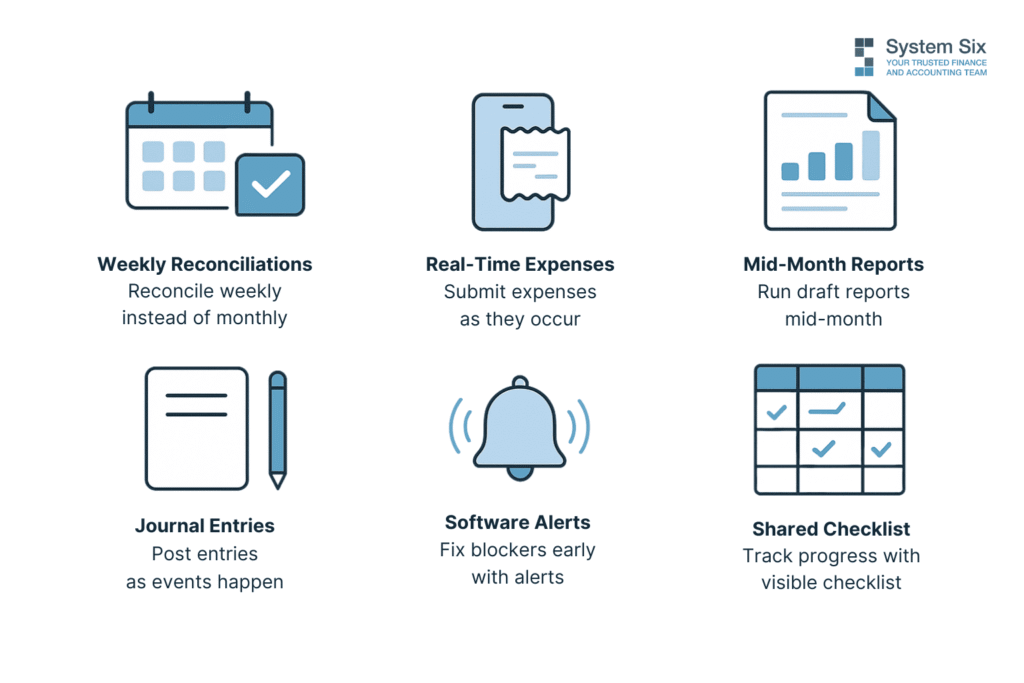
A continuous close process spreads financial tasks across the month instead of concentrating everything at the end. Rather than waiting to reconcile, adjust, and review all at once, your team works in smaller, more regular intervals. This creates less pressure, improves accuracy, and shortens the total time to close.
Shifting to this structure does not require new tools. It requires a consistent approach to timing and task ownership. The more your team gets into a steady rhythm, the easier it becomes to reduce close-related stress.
Here’s how to build and maintain a continuous close:
- Step 1: Break reconciliation into weekly sessions. Instead of waiting for the full month to pass, schedule time each week to reconcile bank, credit card, and cash accounts. Start with accounts that move the most volume.
- Step 2: Encourage real-time expense submissions. Ask team members to upload receipts and enter expenses as soon as they occur. Use tools that let them snap photos and categorize transactions from their phones.
- Step 3: Run mid-month review reports. Midway through the month, generate draft versions of your core reports. Look at your P&L, cash flow statement, and any key budget-to-actual reports. Use these to identify gaps or misclassifications while there’s still time to fix them.
- Step 4: Record journal entries as events happen. If you know a vendor invoice needs to be accrued or a loan payment needs to be allocated, go ahead and post those entries right after the transaction occurs. Spread these tasks across the month so they don’t pile up in the final days.
- Step 5: Use software alerts to stay ahead of blockers. Configure your systems to send notifications for missing receipts, overdue approvals, or unmatched entries. This gives your team a chance to address problems early, rather than discovering them after financial reports are already built.
- Step 6: Share a visible month-to-date checklist with the team. Create a shared task calendar that tracks recurring activities like payroll reviews, revenue recognition entries, or vendor bill processing. Make sure everyone sees what has been completed and what still needs attention.
Metrics to Measure the Efficiency of Your Close
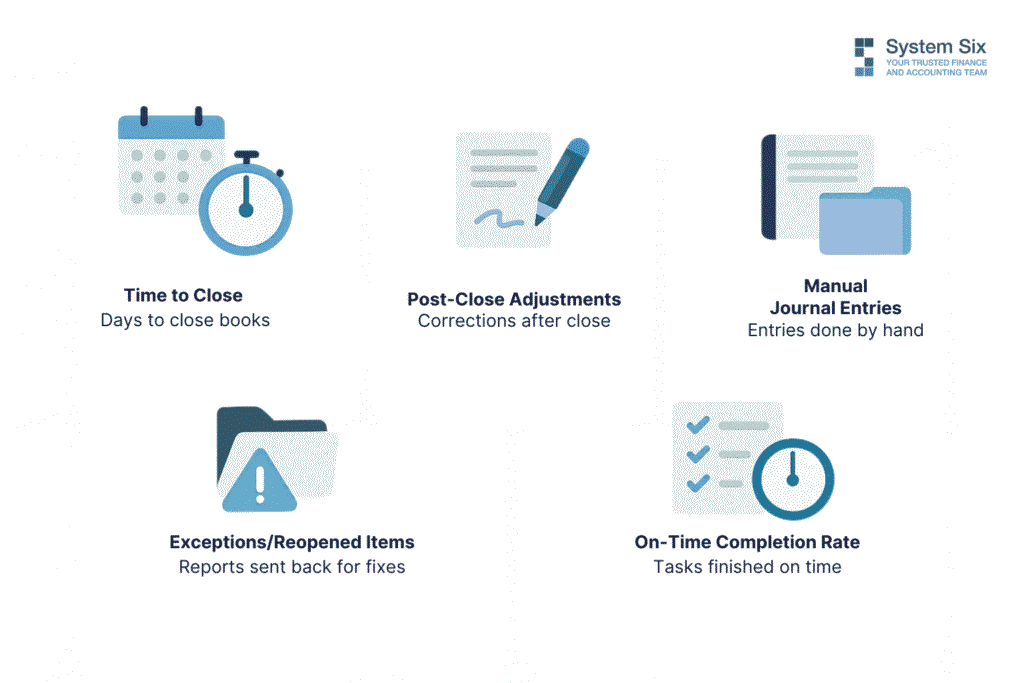
Tracking the right metrics helps you understand how well your close process performs and where it needs improvement. Without data, it’s difficult to spot delays, reduce rework, or justify changes. The following metrics give you a clear picture of timing, accuracy, and effort.
Time to Close
This metric tracks the number of calendar days from the last day of the accounting period to the point when the books are officially closed. It gives you a baseline for process speed. According to Ventana Research, the median time to close for small to mid-sized companies is 6 days. If your team consistently takes longer, it may indicate bottlenecks in reconciliation, approvals, or data collection.
Tracking this metric monthly helps you measure progress and set clear targets. It also supports forecasting and planning, especially when leadership needs timely access to reporting.
Number of Post-Close Adjustments
This metric shows how often your team needs to change the financials after the books have been closed. Frequent post-close adjustments usually signal rushed reviews, missing data, or inconsistent processes. A lower number reflects better documentation, cleaner entries, and stronger internal controls.
You can track this by categorizing the reason for each adjustment and identifying patterns. If you notice recurring corrections tied to a specific process or account, that area likely needs closer attention.
Volume of Manual Journal Entries
This measures how many journal entries your team inputs by hand during the close. High volume often reflects a lack of automation or heavy reliance on spreadsheets. While some manual entries are necessary, too many can increase the risk of errors and slow down the process.
This metric helps you decide where to introduce automation. If a large portion of your entries follow predictable patterns, rule-based tools can handle those and free your team to focus on exceptions.
Number of Exceptions or Reopened Items
This metric captures how often reports, reconciliations, or approvals are sent back for correction during the close. These exceptions slow things down and usually point to gaps in training, unclear roles, or broken handoffs.
Tracking where these reopened items come from can help you improve accuracy at the source. It also gives you an early signal when a process is becoming inconsistent or out of sync with team capacity.
On-Time Completion Rate by Task
This measures how many individual admin tasks are completed on or before their target deadline. By tracking task-level completion, you get a more detailed view of where the delays are happening. You can also see which teams or steps consistently run behind and adjust resources or expectations accordingly.
A strong on-time rate reflects healthy communication, clear ownership, and reliable systems. When this number drops, it usually means confusion or complexity is building up behind the scenes.
Turning the Month-End Close Into a Reliable Business Habit
The most efficient close processes rely on routine. When each task follows a clear sequence and happens on schedule, your team avoids delays, rework, and confusion.
Building consistency doesn’t require major changes. Most improvements start by tightening the steps that cause the most friction. A clear checklist, dependable timelines, and tools that stay connected make it easier to move through the close with fewer blockers.
As your process stabilizes, your accuracy improves. You spend less time fixing last-minute issues and more time reviewing complete, well-documented data. Each close starts to feel like part of your regular workflow rather than a sprint to the finish.
About System Six
System Six is a remote bookkeeping and financial services firm that helps small and mid-sized businesses streamline their financial operations. We specialize in providing technology-driven financial management solutions for consulting firms, allowing owners to focus on growing their businesses without worrying about cash flow, payroll, or compliance issues.
Our team of over 40 professionals brings an average of 10+ years of accounting experience to every client relationship, serving more than 200 businesses across the U.S. From accurate bookkeeping to cash flow forecasting, we deliver the financial clarity and peace of mind that consulting firm owners need to thrive. Learn more at www.systemsix.com.