by Chris Williams | Sep 7, 2026 | Blog
Here is the answer most firms make you sit through a sales call to get: for a typical lower-middle-market deal, a quality of earnings report costs $10,000 to $20,000 for a focused QoE Lite scope, and $25,000 to $50,000 for a full-scope engagement from a boutique firm. National and Big-4 firms start around $100,000. That is the whole market in one sentence.
The more useful questions are what drives where you land in those ranges, which scope your deal actually needs, and how to buy diligence without getting burned on either end of the price spectrum. I have paid for QoE reports three times as a buyer, first in private equity and then buying System Six and two add-on acquisitions, and I have strong opinions on all three questions.
QoE pricing at a glance
| Deal size |
Right-sized scope |
Typical fee |
Notes |
| Under $5M purchase price |
QoE Lite (focused scope) |
$10,000–$20,000 |
Proof of cash, major add-backs, obvious risks, simple working capital analysis |
| $5M–$25M |
Full-scope QoE, boutique or regional firm |
$25,000–$50,000 |
Complete adjustments schedule, NWC peg support, debt-like items, quantified findings |
| Complex or multi-entity at any size |
Full scope, expanded |
Upper end of range |
Deferred revenue, inventory, multiple entities, or messy books push fees up |
| Any LMM deal |
National / Big-4 firm |
$100,000+ |
Frequently junior-delivered under a recognizable brand. You shouldn’t be spending this much. |
Treat these as planning numbers, not quotes. The honest answer for your specific deal depends on the factors below, which is why any provider worth hiring will scope before pricing.
What actually drives the price
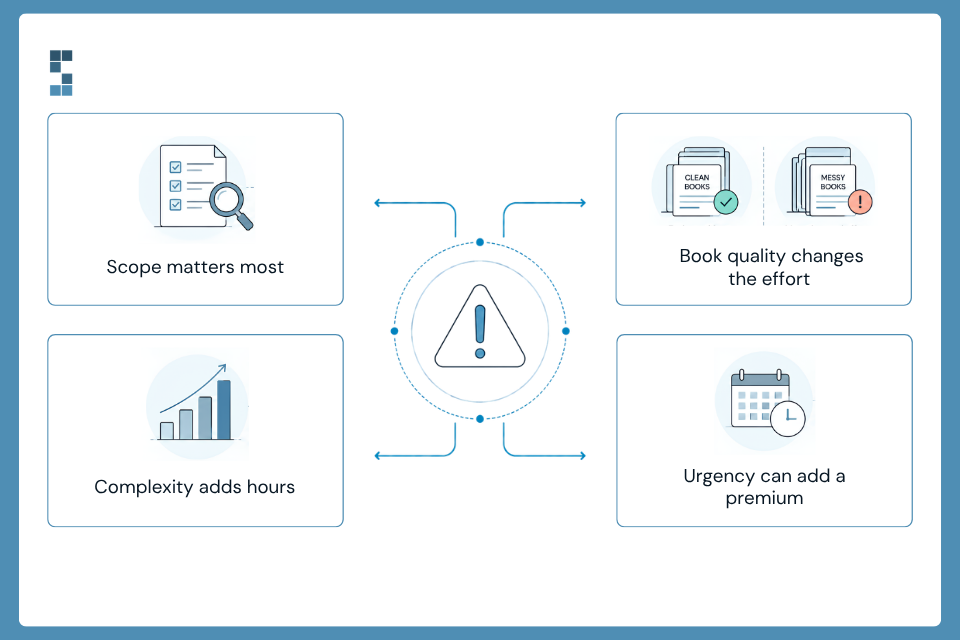
Scope. The biggest lever. A QoE Lite engagement concentrates on proof of cash, the major add-backs, and deal-killer risks and working capital analysis. Full scope adds the complete working capital analysis, debt-like items inventory, revenue cohorts, and quantified findings a lender or investment committee expects. Roughly speaking, full scope is twice the work, and the pricing reflects that.
The state of the books. Clean accrual books in QuickBooks Online price at the bottom of the range. Cash-basis books with commingled personal expenses, an inventory number nobody believes, or a bookkeeper who left last year price higher, because the team has to reconstruct reality before they can analyze it.
Complexity. Multiple entities, deferred revenue, percentage-of-completion accounting, heavy inventory, or franchise structures all add analysis hours. A $4M SaaS company with clean subscriptions can cost less to diligence than a $2M contractor with work-in-progress schedules.
Timeline pressure. A compressed exclusivity window sometimes carries a rush premium. The better fix is starting the data request the day the LOI is signed, which is free.
QoE Lite vs. full scope: matching spend to deal risk
For deals under roughly $5M, QoE Lite is often all you need: it answers the kill-shot questions, including whether cash ties out and whether the add-backs are real, plus a simple working capital analysis. QoE Lite will work well for many deals at this size.
Full scope is where you will often need to be if you are using bank debt outside SBA, raising outside capital, or paying anything above a small-deal multiple. The extra spend buys the schedules you negotiate the working capital peg with and the findings you take back to the seller when the numbers don’t hold.
The pattern I recommend for cost-conscious buyers: start QoE Lite with a pre-agreed upgrade path to full scope if the deal survives the first pass and the deal is large enough to warrant it. Good providers will credit the QoE Lite fee against the full-scope engagement. We structure it this way deliberately, because it puts the diligence spend where the deal risk actually is.
Fixed fee vs. hourly: always push for fixed
Two pricing structures exist in this market, and the difference matters more than the headline number.
Hourly billing puts both the cost risk and the timeline risk on you. Diligence on a messy company expands to fill whatever budget is available, and an open meter gives the provider no reason to be efficient inside your exclusivity window.
Fixed-fee pricing does the opposite: the provider absorbs the overrun risk, and the fee is known before you commit. A firm that has seen enough lower-middle-market books can scope fixed-fee with confidence after a short look at the financials. Reluctance to quote fixed is information about how well they know this market.
Get scope, fee, and start date in writing before you engage. You are buying certainty inside a 60–90 day window; a provider who won’t commit to any of the three is reserving the right to consume your deal clock.
The two ways buyers get burned
Buying too cheap. There are QoE services priced below $10,000, and my advice is to shy away from them. For many buyers this is the most important financial decision of your life, or at least top three alongside a marriage and a house. The cut-rate product is usually a template: no proof of cash, no working capital analysis, no one senior in the workpapers. Don’t skimp on the very work that may save you from blowing it all up.
Buying too much brand. At the other end, a $100,000+ engagement from a national firm buys a logo, and in the lower middle market the logo is rarely required. Lenders and investment committees care that the work is independent, rigorous, and legible. They do not price your loan off the letterhead. If someone is steering you toward a six-figure QoE on a $10M deal, ask exactly what the extra spend buys.
The math that makes the fee irrelevant
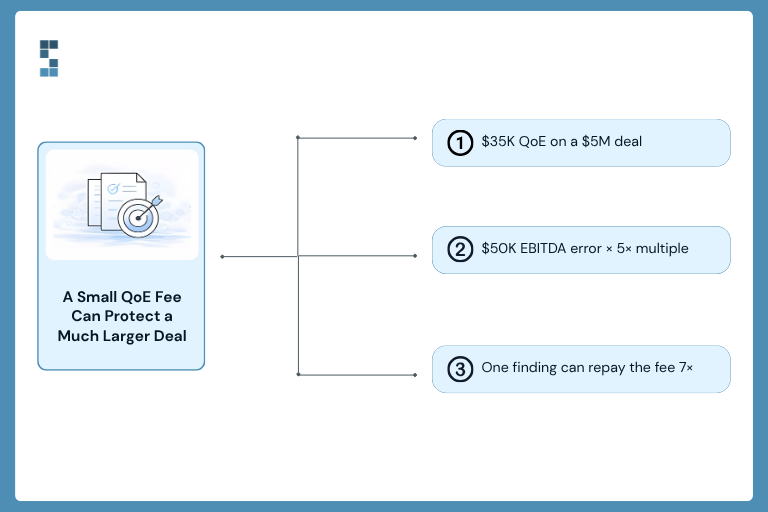
On a $5M deal at 5x EBITDA, a $35,000 full-scope QoE is 0.7% of purchase price. A single disallowed add-back of $50,000 in EBITDA moves the price by $250,000 at that multiple. One finding pays for the report seven times over, and it almost always finds something.
I have watched diligence findings reprice deals by full turns of EBITDA. Measured against what it protects, the QoE is the cheapest insurance in the entire transaction, including your legal spend. For the broader context, see our Quality of Earnings guide.
Who pays, and when
The buyer commissions and pays for a buy-side QoE, and the report is the buyer’s work product. Payment typically lands during exclusivity, after the LOI and before close. If the deal dies because of what the QoE finds, the fee was the best money you ever spent; that is the report doing its job.
Two softeners worth knowing: many SBA lenders allow diligence costs to be included in the loan’s use of proceeds, so the fee can effectively be financed at close. And if you are an independent sponsor or searcher, the QoE fee is a standard deal expense your capital partners expect to see in the budget.
Frequently asked questions
How much does a quality of earnings report cost?
Typically $10,000–$20,000 for a QoE Lite scope on deals under $5M, and $25,000–$50,000 for a full-scope report from a boutique firm on typical lower-middle-market deals. National firms start around $100,000.
Is a QoE priced fixed-fee or hourly?
Both exist in the market. Push for fixed-fee: it caps your cost, transfers overrun risk to the provider, and forces a real scoping conversation up front.
Is a QoE worth it on a small deal?
Yes, scoped correctly. A $10,000–$20,000 QoE Lite on a $2M deal is 0.5–1% of purchase price protecting the other 99%. Skipping diligence to save five figures on a seven-figure decision is a false economy.
Can the QoE cost be financed?
Often. Many SBA lenders permit diligence costs in the loan’s use of proceeds, and equity investors treat the QoE as a standard deal expense in the transaction budget.
Get a fixed-fee quote in one call
Send us the CIM or the seller’s P&L and we will come back with a recommended scope, a fixed fee, exactly who would do the work, and the earliest start date. If QoE Lite is all your deal needs, that is what we will quote.
Get a fixed-fee QoE quote from System Six.

by Chris Williams | Aug 31, 2026 | Blog
The short answer: Probably, yes. Most growing firms accumulate finance tools one subscription at a time until they’re paying for overlapping features, seats nobody uses, and apps that solve problems they no longer have. The fix isn’t just canceling the obvious dead weight. It’s consolidating around a core system that does more of the work, so you stop paying several tools to do one job badly and stop paying yourself to shuttle data between them. The subscription line is the small cost. The real one is the manual work a scattered stack quietly creates.
Miriam sat down to review her firm’s expenses and got a small shock. Her IT consulting practice was paying for two different expense tools, because the team had switched a year ago and nobody ever canceled the first one. There was a project management app that three people had licenses for and none of them opened anymore. A standalone invoicing tool that mostly duplicated what her accounting software already did. And a reporting subscription she’d bought for one board meeting and forgotten. None of it was expensive on its own. All of it, added up, was a car payment she was making every single month for software that was half dead.
If you haven’t looked lately, you probably have a version of Miriam’s stack too. Finance tools have a way of accumulating quietly, one reasonable decision at a time, until you’re paying for a pile of overlap nobody’s using. So let’s do the audit. Where does the money actually leak, why does the stack sprawl in the first place, and what does fixing it really involve? Because the subscription fees, it turns out, are the least of it.
Why do finance software costs pile up unnoticed?
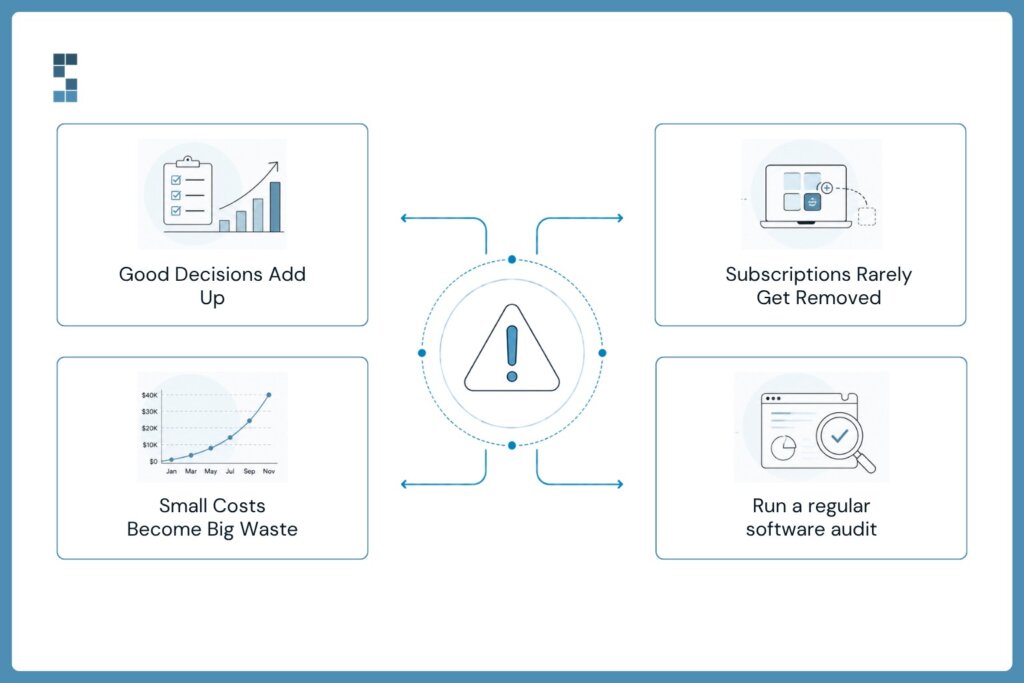
Software sprawl doesn’t happen through bad decisions. It happens through a series of good ones. You add a time-tracking tool because you need to bill accurately. Then a project management app because work is getting complex. Then a CRM, because leads are slipping through the cracks. Then an expense platform, a separate invoicing tool, a reporting add-on. Each one solved a real problem the day you bought it.
The trouble is that nobody ever runs the process in reverse. Tools get added; they almost never get removed. Your needs change, a new app absorbs what an old one did, the team migrates to something better, but the old subscription keeps quietly billing because canceling it is nobody’s job. Consulting firms in the $1M to $5M range typically budget $10,000 to $25,000 a year for financial and payroll services, and the SaaS tools stack on top of that. It’s genuinely easy for a chunk of that spend to be pure waste, redundant seats, overlapping features, zombie subscriptions, and never feel it, because no single charge is big enough to trigger a second look. Sprawl hides in its own smallness.
What’s the real cost of a scattered finance stack?
Here’s the part that matters, and it’s the part almost everyone misses when they think about software costs. The subscription fees are the visible tip. The far bigger cost is what a scattered stack does to your time.
When your financial tools don’t talk to each other, you become the integration. Your revenue lives in your accounting software, gets re-keyed into a cash flow spreadsheet, summarized again in a profitability tracker, and compared once more in a budget report. Each tool holds a piece, and you, or someone you pay, manually carries data between them. That’s not a software cost. That’s a labor cost, and it dwarfs the subscriptions.
And it compounds in two nasty ways. First, error: every manual transfer between disconnected tools is a chance to fat-finger a number, and one wrong figure propagates through every report downstream until someone catches it. Second, drift: when the same number lives in five places, those places fall out of sync, and you end up with reports that disagree and no fast way to know which one is right. Owners routinely find, once they track it, that they’re spending fifty to a hundred percent more time on financial admin than they’d assumed, much of it just moving data between tools that should have been talking on their own. A cheaper stack that’s disconnected can quietly cost far more than a pricier one that’s integrated. Sticker price is not the same as total cost.
How do you consolidate finance tools without losing what works?
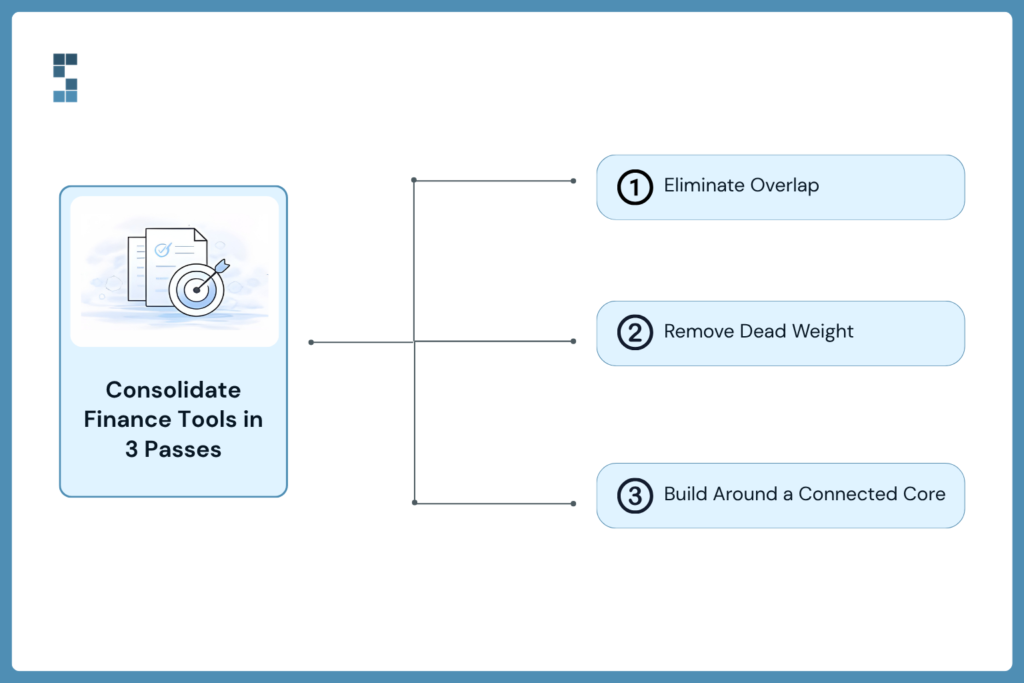
So how do you fix it without blowing up systems your team actually relies on? Not by ripping everything out. By consolidating deliberately, in three passes.
First pass, find the dead weight. Pull every finance-related subscription into one list, what it costs, who uses it, and when someone last actually opened it. This alone is clarifying, and a little alarming. You’ll spot the duplicate expense tool, the licenses assigned to people who left, the app you’re paying for out of pure inertia. Cancel the obvious zombies. That’s found money in the first afternoon.
Second pass, find the overlap. Now look at what’s left and ask which tools are doing jobs another tool already does. A standalone invoicing app when your accounting platform invoices natively. A separate reporting subscription for numbers your core system can produce. This is subtler than killing zombies, because these tools work, they’re just redundant. The question isn’t “does this do something?” It’s “does this do something I’m not already paying for elsewhere?”
Third pass, consolidate around a connected core. This is where the real savings live, and it’s the step people skip. Instead of many tools loosely bolted together, you build around a core accounting system, QuickBooks Online, say, with the tools you genuinely need integrated directly into it, so data flows automatically instead of by hand. The categories most firms actually need are few: solid accounting at the center, and cleanly connected tools for the specific jobs that remain, such as time tracking, expense management, or payroll through platforms like Ramp or Gusto. The goal isn’t the fewest possible tools. It’s the fewest possible disconnected tools.
What you actually save
Add up what consolidation returns and it lands in two buckets, one obvious and one much larger.
The obvious bucket is the canceled subscriptions, the zombies and the overlaps, real dollars back every month starting immediately. Nice, but it’s the small bucket. The large bucket is the time. When your stack is integrated and data flows on its own, the hours you were pouring into manual transfer, reconciliation, and chasing down which report is correct simply evaporate. Firms that move from scattered manual processes to properly integrated systems commonly cut their financial admin time by seventy to eighty percent within about ninety days. That recovered time, redirected to client work, is worth multiples of the subscription savings. The canceled apps get you a rebate. The integration gets you your weeks back.
There’s a quieter dividend, too: clarity. A consolidated, connected stack produces one set of numbers everyone trusts, instead of five that argue. You stop wondering which report is right because there’s one source of truth. That confidence is hard to price, but any owner who’s tried to make a decision on numbers they didn’t quite believe knows exactly what it’s worth. This is the shift System Six builds for the firms it serves, cutting tool sprawl and wiring the essentials into a clean, automated core, and it’s part of why over half of new clients arrive by referral and existing ones rate the firm an average 9.5 out of 10. People don’t refer a shorter software bill. They refer the relief of a stack that finally just works.
So the honest question to close on. When did you last actually look, line by line, at every finance tool you’re paying for, and ask whether it’s earning its keep or just quietly billing you? If you can’t remember, that’s your answer, and the audit will almost certainly pay for itself before lunch. The subscriptions are the small leak. The manual work they create is the flood. Fix both.
Frequently asked questions
How can a small firm reduce its software costs?
Start by listing every finance-related subscription with its cost, active users, and last-used date, then cancel unused “zombie” tools and eliminate ones that duplicate features you already pay for elsewhere. The bigger savings, though, come from consolidating around a connected core system so your tools share data automatically. That removes the manual work a scattered stack creates, which typically costs far more than the subscriptions themselves.
What finance tools does a small consulting firm actually need?
Most firms need fewer tools than they think: a solid core accounting system such as QuickBooks Online, plus cleanly integrated tools for the specific jobs that remain, commonly time tracking, expense management, and payroll through platforms like Ramp or Gusto. The priority isn’t the fewest tools, but the fewest disconnected tools. What matters most is that whatever you use shares data automatically rather than requiring manual transfer.
Is it cheaper to use one integrated system or several separate tools?
An integrated setup is usually cheaper in total cost, even when the software itself costs a similar amount, because it eliminates the hidden labor of manually moving data between disconnected tools. Separate tools create re-keying, reconciliation, and errors that consume far more time than the subscriptions cost. Firms moving to integrated systems often cut financial admin time by 70 to 80 percent, which typically outweighs any difference in software price.
How do I know if I’m paying for software I don’t need?
The clearest test is a line-by-line audit of every finance subscription: if a tool has no active users, duplicates something another tool already does, or hasn’t been opened in months, you’re likely paying for software you don’t need. Overlapping features and licenses assigned to former employees are the most common culprits. If you can’t remember the last time you reviewed the full list, that alone is a strong sign it’s worth doing now.
About System Six
System Six is a Seattle-based bookkeeping and financial services firm that helps small and mid-sized businesses streamline their financial operations. We specialize in providing technology-driven financial management solutions for consulting firms, enabling owners to focus on growing their businesses without worrying about cash flow, payroll, or compliance. Our team of over 40 professionals brings an average of 10+ years of accounting experience to every client relationship, serving more than 175 businesses across the U.S. With a 9.5/10 NPS score, we deliver the financial clarity and peace of mind that consulting firm owners need to thrive. Learn more at www.systemsix.com.

by Chris Williams | Aug 24, 2026 | Blog
The short answer: You’ve outgrown DIY bookkeeping when five things start happening: you’re spending more than a few hours a month on the books, you’re doing them at night or on weekends, you’re postponing decisions because you can’t get current numbers, you keep finding errors or missing deadlines, and the work no longer fits your skill set or your rate. Any one of these is a yellow flag. Two or more, and the books have quietly become the most expensive task you’re still doing for free.
Colin used to do his books on Sunday nights. It started as twenty minutes with a coffee, a quick tidy before the week began. Two years and a dozen new clients later, it was three hours, the coffee had become a glass of wine, and he’d catch himself reconciling accounts while his family watched a movie in the next room. He kept doing it because he’d always done it, and because hiring help felt like admitting he couldn’t handle his own business. He had the sign backwards. Still doing it himself wasn’t proof he had it handled. It was proof he’d outgrown handling it alone.
Here’s the tricky thing about the DIY-to-delegate moment: it never announces itself. There’s no alert that says “you have officially outgrown this.” The books just get a little heavier each month, so gradually you don’t notice the weight until your weekends are gone. So let’s make the invisible visible. Here are five concrete signs the moment has arrived. If you recognize two or more, it’s not too early. It’s overdue.
Sign 1: The books are eating your evenings and weekends
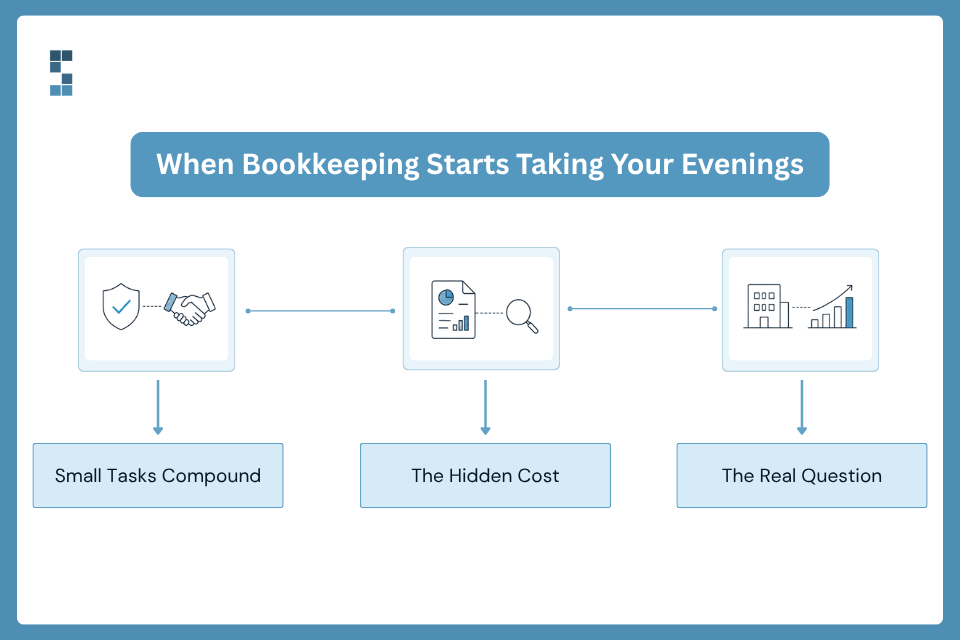
This is the most obvious sign and the easiest to rationalize away. If your bookkeeping happens after hours, because there’s simply no room for it during the billable day, that’s not a scheduling quirk. That’s the work telling you it no longer fits.
Colin’s Sunday nights aren’t unusual. Owners routinely discover, when they actually track it, that they’re spending fifty to a hundred percent more time on financial management than they’d assumed. What feels like “just twenty minutes” on cash flow becomes two and a half hours a week, which is roughly 130 hours a year, more than three full work weeks handed over to data entry. Nobody decides to spend three weeks a year on bookkeeping. It accumulates in twenty-minute lies. When the books have colonized your personal time, the question isn’t whether you can afford help. It’s whether you can afford to keep paying in weekends.
Sign 2: You’re postponing decisions because the numbers aren’t ready
Watch for a specific sentence coming out of your own mouth: “I just need to update my spreadsheets before we can talk about that.” If getting current numbers requires a manual scramble every time, you’ll start avoiding the scramble, which means avoiding the decision.
This is more dangerous than lost time, because it’s lost opportunity. When you can’t quickly see your financial position, you delay the calls that actually move the business, whether to hire, whether to take the big project, whether you can afford to invest. That hesitation has a price, and it’s often a multiple of the hours you’d have saved. A business flying on stale numbers doesn’t crash dramatically. It just quietly makes slower, foggier decisions than its competitors, and wonders why it isn’t pulling ahead.
Sign 3: Errors and missed deadlines are creeping in
Everyone fat-fingers a number occasionally. The warning sign is pattern, not incident: discrepancies between reports that should match, a payroll tax deadline that sailed past, a client billing error that turned into an awkward conversation.
Manual bookkeeping breeds these mistakes structurally, not because you’re careless. When the same number lives in QuickBooks, a cash flow sheet, and a profitability tracker, every update is a chance for the three to drift out of sync, and one mistyped figure quietly poisons every decision downstream until someone catches it. Manish, a business owner who tried the cheaper route first, learned this the hard way: his freelance bookkeeper filed most of the payroll taxes incorrectly, and there was no simple way for a non-expert to untangle the mess. His takeaway was blunt, that going the cheap route is likely to hurt you in the long run, and he’d pay for real expertise without hesitation. Errors aren’t just a cost in dollars. They’re a cost in trust, with clients, with the IRS, and with your own confidence in your numbers.
Sign 4: The work has outgrown your skill set
There’s a difference between basic bookkeeping and what a growing firm actually needs. Cash-basis entries are one thing. Accrual accounting, multi-state payroll, project profitability, milestone billing, and clean books for a potential audit or sale are another, and they’re genuinely specialized.
At some point the honest question is whether you’re the right person for this job at all. Not out of inability, but because your expertise is worth far more pointed at clients. The DIY route can also cap your growth in ways you can’t see: firms have turned down their biggest-ever contracts because their financial systems couldn’t handle the required tracking and reporting. When the books demand skills outside your wheelhouse, muddling through isn’t thrift. It’s a bottleneck you built yourself, and it’s holding back the parts of the business only you can do.
Sign 5: You’re doing for free what you’d never let a client do
Here’s the reframe that cuts through everything. You bill your expertise at a real rate. Every hour on bookkeeping is an hour not billed, so the true cost of DIY isn’t zero, it’s your hourly rate times the hours you sink into it.
Run Colin’s math. An owner billing $200 an hour who spends ten hours a month on financial tasks is sacrificing $24,000 a year in revenue potential, before counting the business development that never happens because the calendar’s full. “Free” bookkeeping is often the most expensive line item in the business, precisely because it never shows up as a line item. John, who runs a small online business, admitted he figured he’d be fine keeping the books in-house and only skeptically tried outsourcing, then found he was incredibly glad he did, because the strategic insight he got back was a gamechanger he’d never have reached alone. That’s the hidden upside of stopping: you don’t just save the hours, you get back capacity and clarity you didn’t know you were missing.
What to do if you recognized yourself
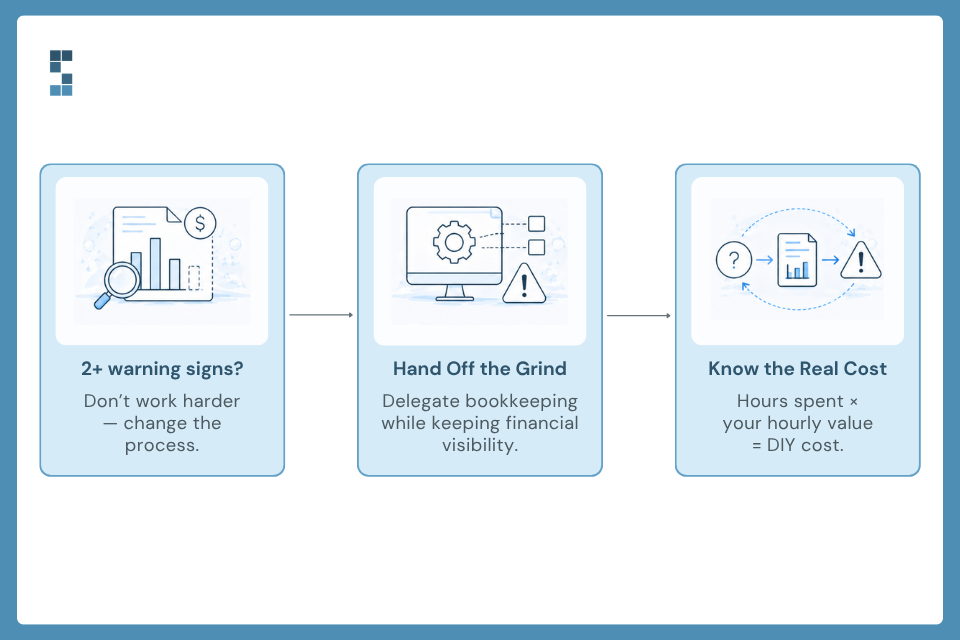
If two or more of these landed, don’t spiral about it, and definitely don’t resolve to try harder. Trying harder is what got the books into your weekends. The move is to hand off the part of the business that’s become a drag on the rest of it.
And handing off doesn’t mean losing control, which is the fear that keeps most owners stuck. It means someone else owns the monthly grind, cleans up what’s drifted, and hands you clean numbers on time, while you finally get to just look at your business instead of assembling it. This is the shift System Six builds for the consulting firms and growing businesses it serves, and it’s why over half of new clients arrive by referral and existing ones rate the firm an average 9.5 out of 10. People don’t refer a bookkeeper. They refer the Sunday night they got back.
So one honest question to close on. If you added up every hour you spent on your books last month and priced it at your real rate, would you call that a bargain, or the most expensive thing on your plate? You already know whether you saw yourself in this list. The only question left is how many more weekends you want to spend proving you can do it alone.
Frequently asked questions
When should a small business owner hire a bookkeeper?
The clearest trigger is when bookkeeping starts costing more than it saves, in time, errors, or missed opportunities. Practical signals include spending more than a few hours a month on the books, doing them after hours, postponing decisions because numbers aren’t current, errors or missed deadlines creeping in, and the work outgrowing your skill set. If two or more apply, it’s generally past time to hire help.
Is it worth paying for a bookkeeper, or should I keep doing it myself?
It’s usually worth it once you count the true cost of DIY, which is your billable hourly rate times the hours you spend, plus the cost of errors and delayed decisions. An owner billing $200 an hour who spends ten hours a month on the books gives up around $24,000 a year in revenue potential. For most growing firms, professional bookkeeping costs far less than the time and opportunity it frees up.
How many hours a month should bookkeeping take?
For a small but growing firm, routine bookkeeping shouldn’t consume more than a few hours of the owner’s month, and ideally far less once systems are automated. Many owners are surprised to find they’re spending 10 to 20 hours monthly once they actually track it. If the real number is well above a few hours, that time is almost always worth more redirected to client work.
What’s the risk of doing my own books for too long?
The main risks are accumulating errors, missed compliance deadlines, and capped growth. Manual systems drift out of sync and produce mistakes that compound until caught, and missed payroll or tax deadlines carry real penalties. Firms have also had to turn down their largest contracts because DIY financial systems couldn’t support the required tracking, a growth cost that never appears on any invoice.
About System Six
System Six is a Seattle-based bookkeeping and financial services firm that helps small and mid-sized businesses streamline their financial operations. We specialize in providing technology-driven financial management solutions for consulting firms, enabling owners to focus on growing their businesses without worrying about cash flow, payroll, or compliance. Our team of over 40 professionals brings an average of 10+ years of accounting experience to every client relationship, serving more than 175 businesses across the U.S. With a 9.5/10 NPS score, we deliver the financial clarity and peace of mind that consulting firm owners need to thrive. Learn more at www.systemsix.com.

by Chris Williams | Aug 10, 2026 | Blog
The short answer: The first 90 days with a new bookkeeping provider follow a recognizable arc. Month one brings relief as the backlog clears and someone else owns the books. Month two brings trust, as the numbers start arriving on time and proving accurate. Month three brings a shift in how you use your books, from checking the past to steering the business. Clients typically report a 70 to 80 percent reduction in administrative time within 90 days, and many say the service pays for itself in that window on time savings alone.
Wesley signed the engagement letter and then, for about a week, quietly wondered if he’d just made an expensive mistake. He’d heard the pitch. Clean books, time back, clarity. But he’d heard pitches before. What he actually wanted to know was simpler and harder to get: what does this look like in three months, from someone who isn’t selling me anything?
Fair question. Marketing copy tells you what a service promises. Clients tell you what it delivers. So instead of another list of features, here’s the honest arc of the first 90 days, built from what System Six clients have actually said about it. Some of it is what you’d expect. Some of it isn’t. And the most interesting part, the thing almost nobody anticipates, doesn’t show up until month three.
What happens in the first 30 days?
Month one is about relief, and it arrives faster than most people expect.
The first thing that happens is that the backlog stops being yours. Someone else takes over the monthly bookkeeping and reconciliation, cleans up the errors sitting in your existing data, and gets automated workflows running for payables, receivables, and payroll. You get secure, cloud-based access so you can actually see your own numbers without asking anyone. Most of this happens without much input from you, which is itself a novelty if you’ve been the bottleneck for years.
What clients describe in this window is less about spreadsheets and more about their nervous systems. Betsy, who runs an investor-backed business, said System Six had done wonders for her stress level, that it finally felt like this was all taken care of with a professional partner. That’s month one. Not a dashboard. A dropped weight. The mental background process that had been running for years — are the books okay, did I miss something — finally switches off.
Is everything perfect by day 30? No. You’re still learning each other’s rhythms, and the cleanup often turns up things nobody knew were wrong. But the direction of travel is obvious immediately, and that’s what makes the first month feel like a decision you got right.
What changes by day 60?
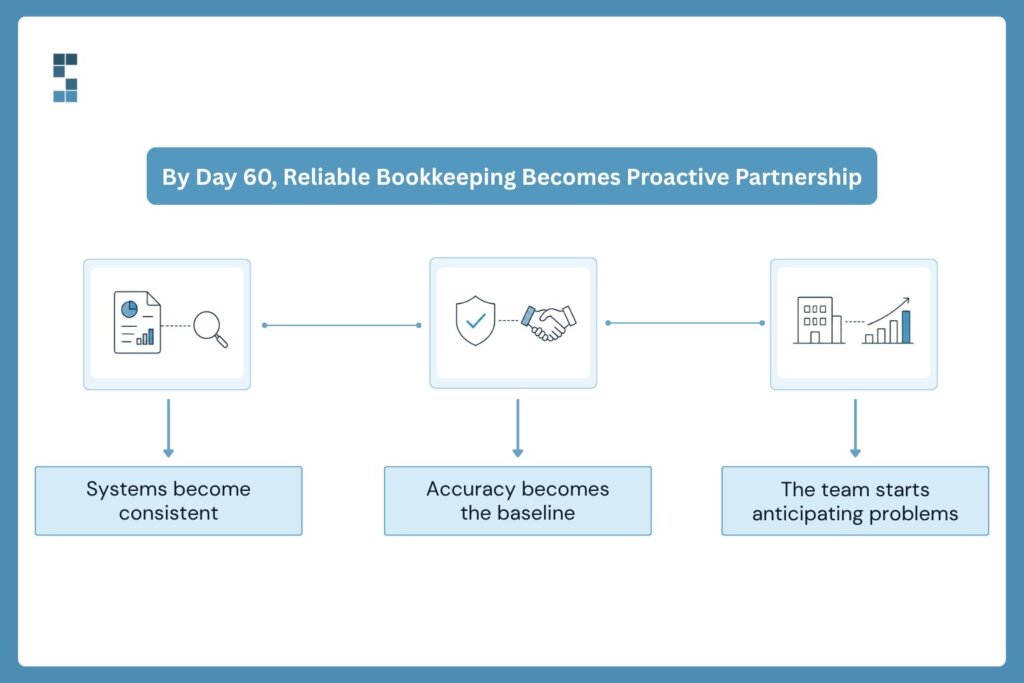
Month two is where relief hardens into trust, and trust is a different thing entirely. Relief is emotional. Trust is earned, repeatedly, by numbers that show up on time and turn out to be right.
By this point the systems built in month one are running. Bank feeds flow automatically, categorization follows rules tuned to your business, and reporting arrives with current data instead of last quarter’s. The close gets faster. The reports stop being a thing you chase and start being a thing that appears.
But here’s what clients actually talk about at the 60-day mark, and it’s rarely the software. It’s the behavior of the people. Marcus, who works with the team on an investor-backed business, said he feels he’s in good hands and especially appreciates how they’re inquisitive, ask follow-on questions, and look around corners. John put it even more bluntly, telling the team to mark him down as an 11 out of 10 on any internal satisfaction tracking, calling the team awesome and proactive and exactly what he needed.
Notice what both of those are describing. Not accuracy, which they take as table stakes by now, but anticipation. The difference between a bookkeeper who records what happened and a partner who notices what’s about to happen. That’s the month-two revelation for most clients: they hired someone to keep the books and got someone who watches the road ahead.
There’s an external signal that tends to land around this point too, and it carries unusual weight. One client mentioned that System Six had been recommended by their CPA as the best firm in the business for a company their size. Think about why that matters. Your CPA has no incentive to flatter your bookkeeper; if anything, sloppy books make their job harder and their fees higher. When the person who has to work downstream of your bookkeeping vouches for it, that’s a professional endorsement rather than a marketing claim. By day 60 you’re usually not the only one who has noticed things got better.
What does month three look like?
Month three is when the relationship changes character, and this is the part people don’t see coming.
For the first two months, you use your books to answer questions about the past. What did we spend? Did that client pay? By day 90 something flips. The numbers are current and reliable enough that you start using them to make decisions about the future. Which service line deserves more attention. Whether you can afford the next hire. Whether that big opportunity is actually as profitable as it looks. Orlan described System Six as their secret weapon when it comes to getting their finances in order, and “secret weapon” is a telling phrase. Nobody calls a bookkeeper a weapon. They call a competitive advantage a weapon.
The numbers back up the vibe shift. Clients typically see a 70 to 80 percent reduction in administrative time within 90 days, and the automation work often pays for itself inside 60 to 90 days on recovered time alone. But the more interesting result is what people do with that capacity. Trevor, looking back over the first year, simply said his firm was in a much better place than it had been twelve months earlier because of the improvements made to their bookkeeping process. That’s the quiet compounding: fix the foundation, and everything built on it gets steadier.
And there’s a trust dividend that shows up at the far end. Paul told the team that hiring them was the best decision he made at the start of his business, and that after their 2022 audit the auditors found exactly zero errors. Not only had the team been mistake-free, he said, they’d been proactive about catching his mistakes and spotting challenges coming down the road. An auditor finding nothing is the most boring possible outcome, and boring, when it comes to your books, is the entire point.
What the pattern tells you
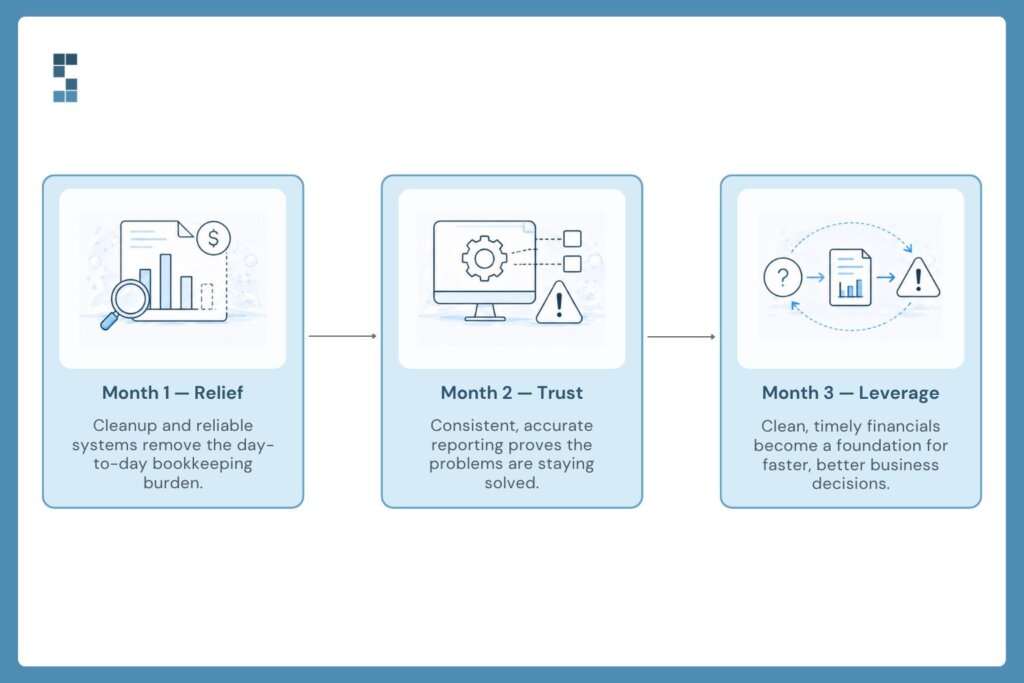
Read those experiences together and a shape emerges. Relief, then trust, then leverage. Month one takes the weight off. Month two proves the weight stays off. Month three turns clean books into better decisions.
It’s worth saying that not every relationship is identical. Firms arriving with messier books spend more of month one on cleanup. Firms already on solid systems move faster. But the sequence holds, because it’s less about the software than about what it takes for a person to stop worrying about something. You have to feel the burden lift, then watch it stay lifted, before you’ll start building on top of it.
That pattern is also why the strongest proof isn’t a statistic — it’s the fact that clients keep saying it out loud. Over half of System Six’s new clients each year come by referral, and existing clients rate the firm an average 9.5 out of 10 when asked whether they’d recommend it. Mari, after working with the team, described being impressed by how knowledgeable, thorough, thoughtful, and detailed they were. People don’t refer competence. They refer relief.
So back to Wesley’s question, the one worth asking before you sign anything. Not “what does this service promise?” but “what will I actually be feeling in three months?” Based on what clients say: lighter in month one, confident in month two, and by month three, a little annoyed you didn’t do it sooner.
Frequently asked questions
How long does it take to see results from a new bookkeeping provider?
Relief usually comes within the first 30 days, once the backlog is cleared and someone else owns the monthly bookkeeping and reconciliation. Measurable results follow quickly after: clients typically report a 70 to 80 percent reduction in administrative time within 90 days. Firms arriving with messier books spend more of the first month on cleanup, but the overall arc holds.
What results do bookkeeping clients actually report?
The most common reported outcomes are reduced administrative time, faster and more reliable monthly reporting, and significantly lower stress. Clients frequently highlight proactive service, being asked the right questions and having problems caught early, as much as they highlight accuracy. One client reported an external audit that found zero errors in the firm’s work.
How quickly does outsourced bookkeeping pay for itself?
For many firms, within 60 to 90 days on recovered time alone, before counting avoided errors or penalties. The payback comes from owner and staff hours redirected away from manual financial administration and back into billable or growth work. Firms with larger administrative burdens before the switch tend to see the fastest payback.
What should I expect in the first 90 days with a new provider?
Expect a three-stage arc. The first month centers on cleanup, system setup, and immediate relief from the administrative load. The second month builds trust as reporting becomes timely and accurate and the team starts flagging issues proactively. By the third month, most clients shift from using their books to review the past to using them to make forward-looking decisions about hiring, pricing, and growth.
About System Six
System Six is a Seattle-based bookkeeping and financial services firm that helps small and mid-sized businesses streamline their financial operations. We specialize in providing technology-driven financial management solutions for consulting firms, enabling owners to focus on growing their businesses without worrying about cash flow, payroll, or compliance. Our team of over 40 professionals brings an average of 10+ years of accounting experience to every client relationship, serving more than 175 businesses across the U.S. With a 9.5/10 NPS score, we deliver the financial clarity and peace of mind that consulting firm owners need to thrive. Learn more at www.systemsix.com.

by Chris Williams | Aug 3, 2026 | Blog
Before I bought System Six, I had to answer this question with my own money. I was leaving a private equity career to acquire a bookkeeping firm with an SBA loan and a personal guarantee. If AI was about to automate bookkeeping away, I was about to make the worst financial decision of my life.
So I did what buyers do: I went deep. I studied the AI bookkeeping startups. I talked to investors in some of the best-funded ones. And I bought the human bookkeeping firm anyway. Several years in, with revenue up every year since, here is the honest version of what I learned — including the parts that should worry some bookkeepers.
Everyone asks this question. I asked it during diligence.
The question is not hype-driven; it is rational. Bookkeeping looks like exactly the kind of work AI should eat: repetitive, rules-based, digital. And a wave of venture-backed startups raised hundreds of millions of dollars saying precisely that.
What I found when I looked under the hood was different from the marketing.
What happened to the ‘AI bookkeeping’ wave
The cautionary tale is ScaleFactor, a startup that raised roughly $100M claiming AI-powered bookkeeping.
It’s a good story that went down in flames, because they were telling everybody they were AI — and then all the investors realized this isn’t AI, it’s offshore resources plus some tech. And they shut down.
Chris Williams, Acquiring Minds
And it was not just one bad actor. During diligence I talked to people close to the biggest names in the category:
Pilot and Bench and Botkeeper… if you talk to them as part of diligence — I talked to some investors in those businesses — they’re like: yeah, it’s tech-enabled. It’s not full AI yet, because it’s just more complicated than people thought it was.
Chris Williams, Acquiring Minds
Several firms that launched as ‘AI for bookkeeping’ quietly pivoted to API integrations, some automation, and offshore labor doing the rest. The pattern repeated after the podcast was recorded, too. [UPDATE: add 2024-2026 developments here — e.g., Bench’s abrupt December 2024 shutdown and acquisition, and the current state of AI bookkeeping tools — verify facts before publish.]
What AI actually does well in bookkeeping
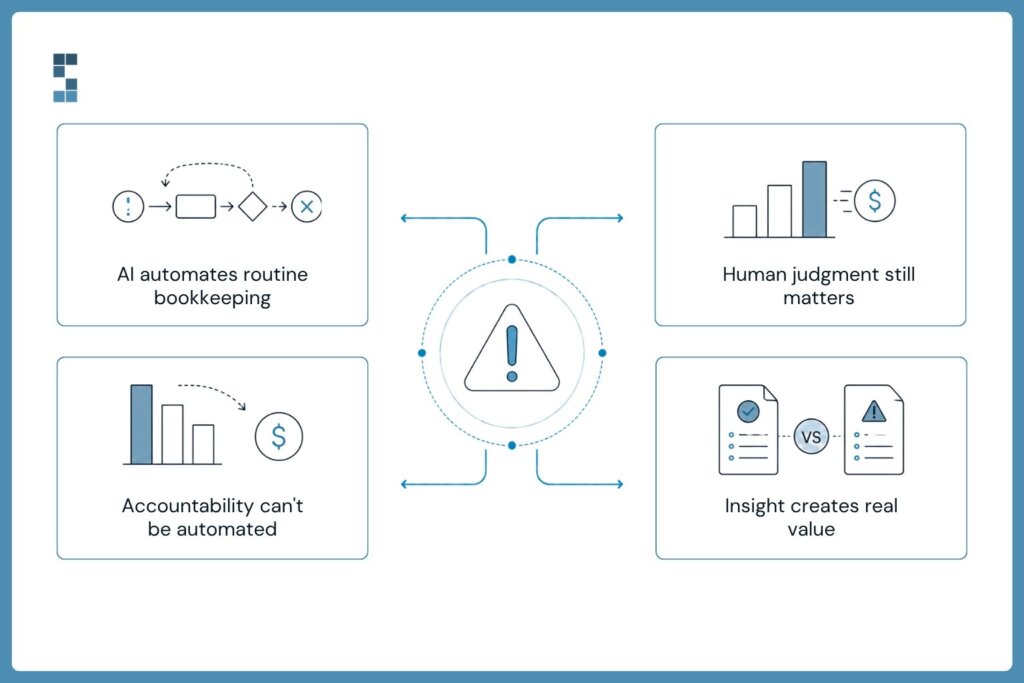
Here is the part that should worry bad bookkeepers: the routine layer really is getting automated, and I said so before I owned the firm.
The very basic reconciliation work or transaction coding — where you’re basically taking credit card transactions and putting them to the right account in your QuickBooks file — that’s already getting somewhat automated. That will continue to get further automated.
Chris Williams, Acquiring Minds
That prediction held. Today, automation and AI handle a meaningful share of transaction categorization, bank-feed matching, receipt capture, and anomaly flagging — and we use those tools aggressively inside our own workflows. [UPDATE: name the current tools/AI capabilities System Six uses in 2026.] If a provider is doing all of this by hand, you are paying for inefficiency.
What AI still does not do is the part clients actually pay for:
- Judgment calls: how to treat an unusual transaction, when something in the books signals a real business problem, what accrual treatment fits a messy contract.
- Accountability: someone whose name is on the work, who fixes it when a bank feed silently breaks or a payroll filing bounces.
- The advisor relationship: explaining what the numbers mean and what to do about them, in a conversation, with context about your business.
The bet I made: automation moves, humans judge
When I decided to buy, this was the thesis I hung my hat on:
At the end of the day, does the client want to deal with a robot, or somebody in an offshore capacity — or do they want to deal with a trusted advisor, US-based? That’s where we’re hanging our hat… There still has to be a person for the judgment-call stuff, and also just to be the adviser to the client. I don’t think that will ever get automated away.
Chris Williams, Acquiring Minds
Notice what the bet was not. It was not that AI would fail — it was that AI would commoditize the bottom of the market while making great humans more valuable. Clients who want the cheapest, lowest-touch service will increasingly be served by software, and that is fine. Clients who want someone to take real ownership of their finance function — bookkeeping plus payroll, bill pay, invoicing, and a controller-level second opinion — want a human team that uses the best tools, not a tool with no human behind it.
We priced and positioned the firm accordingly: higher service, higher value, deliberately not chasing the cheapest clients. Years later, that segmentation is exactly how the market has split. [UPDATE: add a current proof point — client growth, retention rate, or a client quote.]
What this means if you’re choosing a bookkeeping provider in 2026
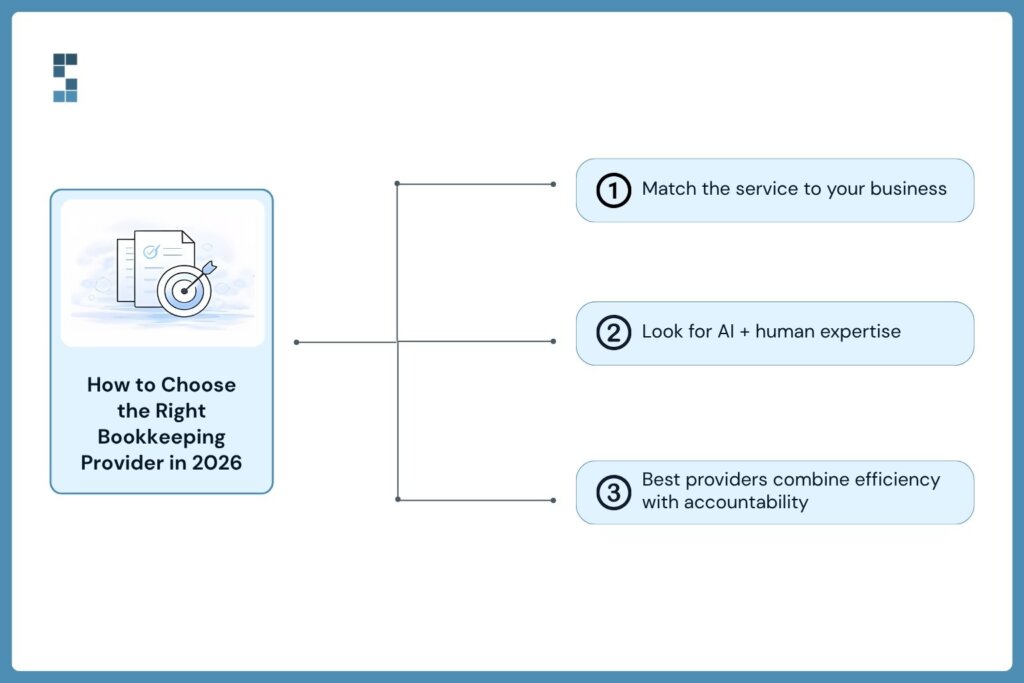
Whether you should use an AI-first service or a human team depends on what your books are to you:
- If your business is simple — low transaction volume, cash basis, no payroll complexity — an AI-first or software-only service is a legitimate, cheap option. Go in with eyes open about support when something breaks.
- If you run decisions off your financials, have payroll and bill pay, or answer to a lender or investors, you want humans with AI leverage: the automation catches the routine, a named team catches what the automation misses.
- Ask any provider the ScaleFactor question: what exactly does your AI do, and who checks its work? A confident provider will answer specifically. A marketing-driven one will repeat the word AI.
Frequently asked questions
Will AI replace bookkeepers?
It is replacing the routine layer — transaction coding, reconciliation matching, receipt capture — and it will keep absorbing more. It is not replacing judgment, accountability, or the advisor relationship. Bookkeepers who refuse to use AI will be replaced by bookkeepers who use it well.
Is AI bookkeeping accurate?
For clean, high-volume, repetitive transactions, quite accurate. The failure mode is silent errors on unusual items: miscategorized transactions that compound for months because no one with context reviewed them. That is why the working model is AI plus human review, not AI alone.
What happened to ScaleFactor?
It raised roughly $100M claiming AI-powered bookkeeping, and shut down in 2020 after it became clear the ‘AI’ was largely offshore accountants plus some tech. It remains the category’s cautionary tale about marketing outrunning capability.
Are services like Pilot actually AI?
They are tech-enabled human services: software handles integrations and automation, people do the judgment work. That is not a criticism — it is the model that works. The distinction matters when a provider’s pricing or marketing implies no humans are needed.
Should I use an AI bookkeeping service or a human team?
Simple books and tight budget: AI-first is viable. Real complexity — payroll, bill pay, accrual, investor reporting — get a human team that uses AI for leverage. The cost difference buys you someone accountable when it matters.
Talk to a human team that uses AI properly
We are not anti-AI — we are anti-unaccountable. Our team automates everything worth automating and puts a named, US-based human behind every judgment call. If you want to see exactly where AI fits in your books and where it should not, book an intro call and we will walk you through it with your own numbers.
Book an intro call with System Six.
by Chris Williams | Jul 27, 2026 | Blog
Most explanations of a quality of earnings report are written by firms that sell them, for an audience they assume already knows the vocabulary. I came to this from the other direction. I spent years in private equity reading QoE reports, then spent a year as a searcher trying to buy a company with my own money on the line, and then actually bought one. I have been the person staring at a seller’s adjusted EBITDA wondering which add-backs were real, with an exclusivity window burning down and a lender asking for third-party validation. Three times now, since we’ve done two add-on acquisitions.
So this guide covers what a quality of earnings report actually is, what’s inside one, what it costs, how long it takes, and how to choose who does yours, written the way I wish someone had written it for me before my first deal.
What a quality of earnings report is (and is not)
A quality of earnings report, or QoE for short, is an independent analysis of a company’s financial performance, built for one purpose: a transaction. If you are asking what QoE means in finance, it is this: a third-party examination of whether the earnings a seller is showing you are real, recurring, and transferable to a new owner.
Those three words carry the whole engagement. Real means the revenue and expenses tie to cash or correct accrual concepts, not to optimistic bookkeeping. Recurring means the EBITDA you are paying a multiple on will keep showing up after close, rather than being propped up by one-time projects, a COVID bump, or a customer that just churned. Transferable means the earnings don’t walk out the door with the seller: they aren’t dependent on the owner’s relationships, below-market rent from a building the seller keeps, below-market wages or benefits, missing PTO accruals, and so on. Will the earnings the seller is showing you actually show up in Month 1?
A QoE is just as defined by what it is not. It is not an audit: no legal opinion is issued, and it does not certify GAAP compliance, but it will certainly look for inconsistencies. Just know it can’t catch everything. If you don’t trust your seller, don’t rely on your QoE to 100% protect you. It is not a valuation; it will not tell you what the business is worth, though it gives you the corrected earnings number you apply your multiple to. And it is not a guarantee; it is a diligence tool that converts “trust me” into schedules you can verify.
In the lower middle market, where most sellers have never had audited statements and the books are kept on a cash basis by a part-time bookkeeper, the QoE is usually the first time anyone has rigorously tested the numbers at all. That is exactly why buyers, lenders, and investors insist on it. And if anyone you are working with is not insisting on it, you may want to consider how good of a partner they really are.
QoE vs. audit vs. review: what’s actually different
This is the most common point of confusion, so let me be precise. An audit answers: do these historical financial statements fairly present the company’s position under GAAP? A review is a lighter version of the same question. A quality of earnings analysis answers a different question entirely: can you, the buyer, rely on these earnings to price and finance this deal?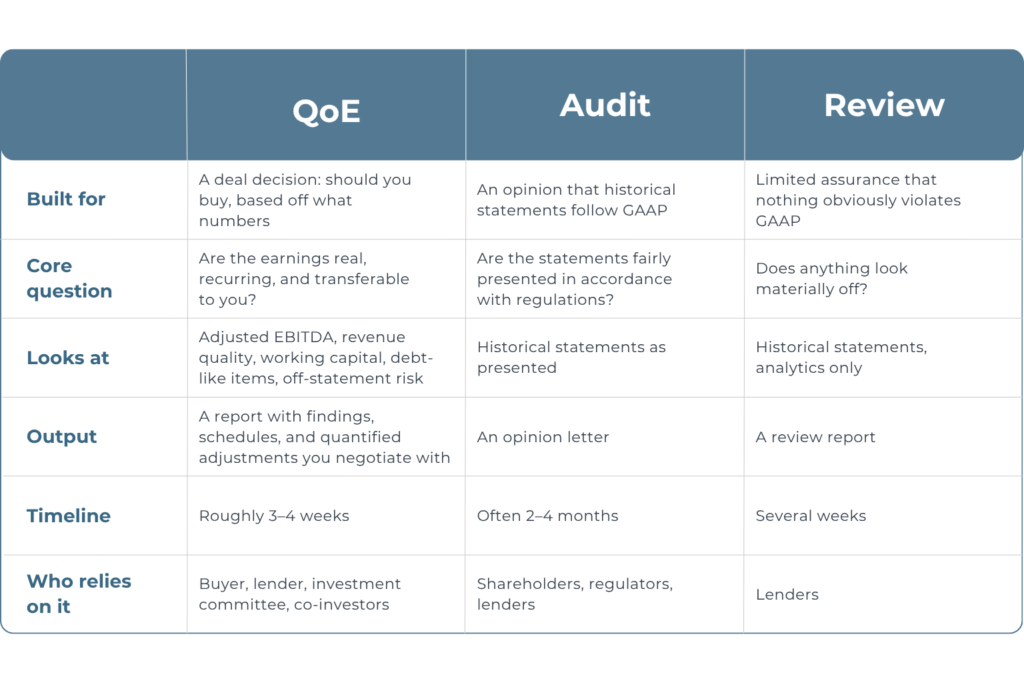 The practical implication: an audit can be clean and the deal can still be terrible. Audited statements can fairly present earnings that are entirely dependent on one customer, stuffed with owner expenses, or about to fall off a cliff. The QoE exists to catch precisely the things an audit is not designed to look for. If a seller tells you “we have audited financials, you don’t need a QoE,” that is a misunderstanding at best.
What’s inside a QoE report, section by section
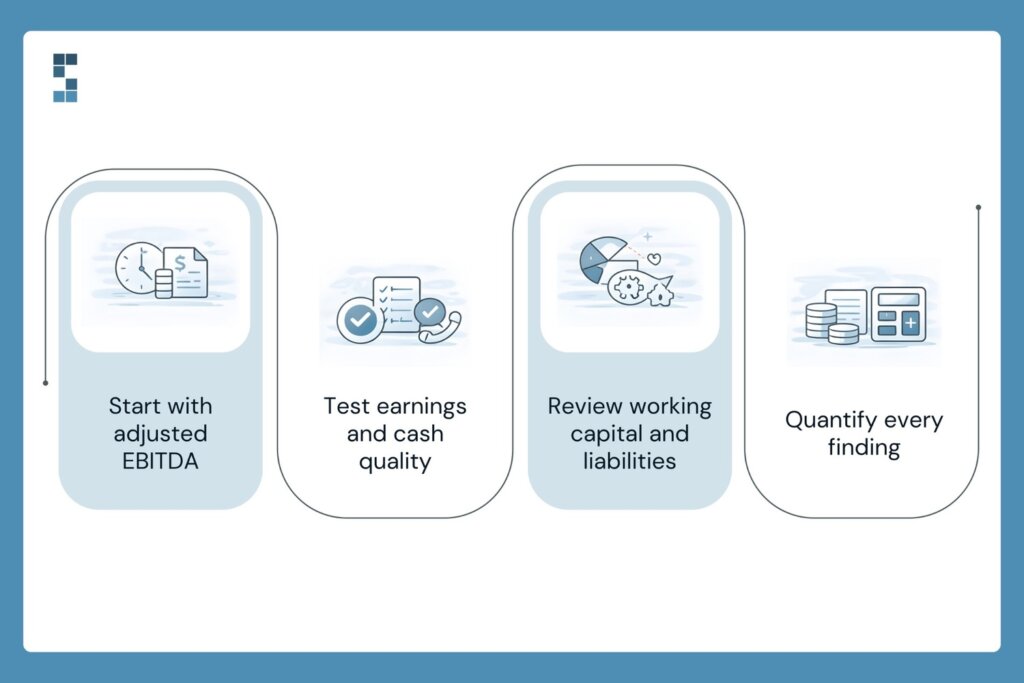
A good quality of earnings report follows a recognizable anatomy. Here is what each section does and why you should care about it.
Executive summary. The first two pages should lead with the answer: here is reported EBITDA, here is what we think true adjusted EBITDA is, here is the bridge between them, and here are the findings that should change how you think about price and terms. If a provider buries the conclusion on page 40, that tells you who the report was really written for.
The EBITDA bridge and adjustments schedule. This is the heart of the report: a line-by-line walk from reported EBITDA to adjusted EBITDA. Every seller’s add-back gets tested. Owner compensation is normalized to market rate, personal expenses run through the business get flagged, one-time legal or moving costs get isolated, and related-party rent gets marked to market. Some adjustments cut in your favor; plenty cut against the seller’s number. On a 4–7x multiple, every dollar of EBITDA that doesn’t survive scrutiny is four to seven dollars of purchase price.
Revenue quality and customer analysis. Recurring versus one-time revenue, customer concentration, cohort and retention trends, pricing versus volume growth. A company growing entirely through price increases on a shrinking customer base looks identical to a healthy grower on the P&L summary, and completely different here.
Proof of cash. The analysis ties reported revenue and earnings back to actual bank activity. For lower-middle-market companies with unaudited, cash-basis books, this is the single most important credibility test in the report. If earnings can’t be traced to the bank, nothing else in the data room matters.
Net working capital analysis. The report establishes what normal working capital looks like across the trailing twelve months, which becomes the basis for the NWC peg, the target that determines whether you get a credit or write another check at close. Buyers consistently underestimate this section; the peg quietly moves real dollars. I can’t overstate enough how important this is. I’ve seen too many buyers buy a decent business but then come to really struggle as they come into a cash crunch from oversights related to QoE.
Debt and debt-like items. Beyond the obvious bank debt: deferred revenue, unpaid payroll taxes, customer deposits, accrued PTO, pending sales-tax exposure. These are dollar-for-dollar price reductions hiding in the balance sheet, and sellers rarely volunteer them.
Findings and considerations. The issues that don’t fit a schedule: GAAP departures, related-party entanglements, off-balance-sheet liabilities, accounting changes that flatter the trend. Each finding should be quantified where possible; a finding without a dollar figure is an anecdote, not a negotiating position.
Who actually needs a quality of earnings report
The short answer: anyone buying a business with their own money or someone else’s, and anyone whose capital depends on the deal being what the seller says it is.
Buyers, from individual searchers to independent sponsors to funds. If you are acquiring a company in the lower middle market, the QoE is your primary defense against overpaying. You are typically buying unaudited books, and you are personally guaranteeing debt or investing the bulk of your net worth. I have watched findings from diligence reprice deals by full turns of EBITDA. The report pays for itself the first time it finds something, and it almost always finds something. The QoE often does double duty: it protects you, and it is the trust instrument that makes your deal credible to family offices and co-investors who weren’t in the room. An LP-ready report from a recognized provider travels with the deal.
Lenders. SBA lenders, senior lenders, and private credit funds increasingly require an independent QoE before committing financing, particularly when the borrower is a first-time buyer. The bank is underwriting the same earnings you are; they want third-party validation, not the seller’s spreadsheet.
Sellers, sometimes. Sell-side QoE exists. Owners commission one before going to market to find the problems first and defend their number. This guide is written for the buy side, but if you are a seller reading this: every issue covered here will be found eventually. Better that you find it.
What a quality of earnings report costs
Pricing follows scope, deal size, and the state of the seller’s books, but the market clusters into three tiers.
- Focused-scope QoE / QoE Lite: roughly $10,000–$20,000 for smaller deals (<$5M). A concentrated look at proof of cash, the major add-backs, and the obvious risks. Appropriate for smaller deals and first-pass screening. There are services below $10,000, but my advice is to shy away from those. This is for many the most important financial decision of your life, or Top 3 (marriage, house, business acquisition). Don’t skimp on the very work that may save you from blowing it all up.
- Full-scope QoE from a boutique or regional firm: roughly $25,000–$50,000 for typical lower-middle-market deals. The full anatomy described above, sized to the complexity of the business.
- National and Big-4 firms: $100,000+, with the work frequently performed by junior staff under a recognizable brand. For LMM deals, you are often paying for a logo your lender doesn’t actually require. You shouldn’t be spending this much.
Two pricing structures exist: fixed-fee and hourly. Push hard for fixed-fee. Diligence on a messy company expands to fill whatever budget is available, and an hourly engagement puts the timeline risk and the cost risk on you simultaneously. A provider who has seen enough LMM books can scope fixed-fee with confidence; reluctance to do so is information.
One more framing that matters: on a $5M deal at 5x, a $35,000 QoE is 0.7% of purchase price. A single disallowed add-back of $50,000 in EBITDA moves price by $250,000. The asymmetry is the whole argument.
How long a QoE takes
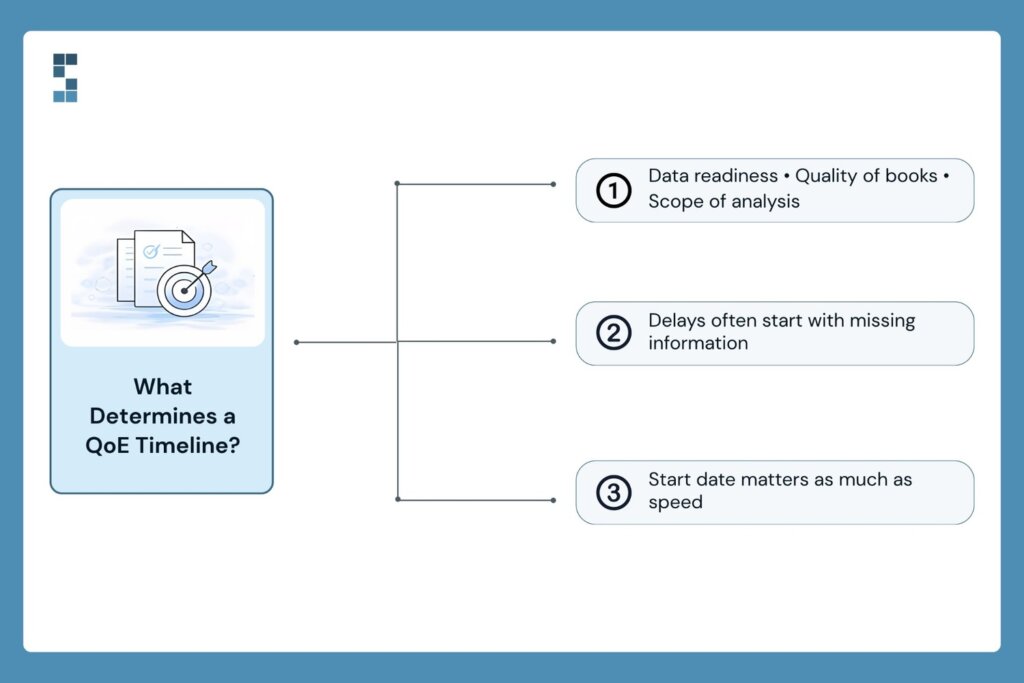
The honest range is three to four weeks from data delivery to draft report for a typical lower-middle-market deal, with three things driving where you land in that range.
First, data readiness. The clock starts when the seller delivers the day-one request list: financial statements, trial balances, bank statements, customer-level revenue, payroll detail. A seller who takes three weeks to produce bank statements adds three weeks to your timeline. Get the request list to the seller the day the LOI is signed. Make sure it’s only the most important things you request. Don’t kill the deal immediately with a massive, overwhelming diligence list.
Second, the state of the books. Clean accrual books in QuickBooks Online move fast. Cash-basis books with commingled personal expenses and an inventory number nobody believes move slower, because the team is reconstructing reality before they can analyze it.
Third, scope. A QoE Lite engagement can land inside ten business days; a full-scope analysis of a multi-entity company with deferred revenue takes the full month.
The reason timeline matters so much: most LOIs grant 60–90 days of exclusivity, and financing, legal, and confirmatory diligence all queue behind the QoE. A provider who quotes six to eight weeks because of staffing backlog is consuming your negotiating window. Ask about the start date, not just the duration. A fast team that can’t start for a month is slower than a steady one that starts Monday.
QoE Lite vs. full-scope: which one you actually need
A QoE Lite covers the kill-shot questions: does cash tie out, are the major add-backs real, is there a customer concentration or revenue-quality problem severe enough to walk away from, and some simple working capital analysis. It is the right tool when the deal is small, the books are simple, or you want a cheap early answer before committing to full diligence.
Full scope adds the complete working capital analysis, debt-like items inventory, detailed revenue cohorts, and quantified findings: the material you need to negotiate the peg, size an escrow, and satisfy a lender or investment committee. If you are using bank debt outside SBA, raising outside capital, or paying anything above a small-deal multiple, full scope is often where you will need to be.
A sensible pattern for cost-conscious buyers: start QoE Lite, with a pre-agreed upgrade path to full scope if the deal survives the first pass and if the deal is large enough. QoE Lite will work well for many deals.
Good providers will structure the engagement that way and credit the QoE Lite work against the full-scope fee. We scope this way deliberately. It puts the diligence spend where the deal risk actually is.
How to choose a QoE provider
Bookkeeping taught me that low barriers to entry produce enormous quality variance, and transaction diligence is no different. Six criteria separate providers who protect buyers from providers who produce shelf documents.
- Who does the work? The industry’s open secret is partner-sold, analyst-delivered: a partner wins the engagement and a rotating bench of juniors performs it. Ask exactly who will touch your deal, and whether the person in the sales call will be in the workpapers.
- Lower-middle-market fluency. A team calibrated on $500M companies will misread a $4M one, flagging normal owner-operator behavior as chaos while missing the actual LMM risks: payroll-tax exposure, related-party rent, cash revenue leakage.
- The sample-report test. Ask for a redacted sample before engaging. You are looking for an executive summary that leads with the answer, quantified findings, and schedules a lender can use. If the sample reads like a compliance document, your report will too.
- Defensibility under scrutiny. Your report will be attacked, by the seller’s accountant disputing adjustments and by your lender’s credit committee testing assumptions. Ask the provider how their adjustments have held up in retrades and whether lenders have accepted their reports without re-work.
- Fixed fee and a real timeline commitment. Scope, fee, and start date in writing. You are buying certainty inside an exclusivity window; a provider unwilling to commit to either is reserving the right to consume your deal clock.
- A relationship, not a transaction. The best diligence engagements are conversations: findings surfaced as they emerge, not detonated in a final readout. You want a partner who picks up the phone when the seller’s CFO says something odd on a Tuesday. This is the difference between white-glove diligence and a PDF.
Notice what is not on the list: brand prestige. In the lower middle market, lenders and investment committees care that the work is independent, rigorous, and legible, not that it carries a Big-4 logo and a Big-4 invoice.
Frequently asked questions
What is QoE in finance?
QoE stands for quality of earnings: an independent analysis, performed during M&A diligence, of whether a company’s reported earnings are accurate, sustainable, and transferable to a buyer. The deliverable is a quality of earnings report.
What does a quality of earnings report show?
A bridge from reported to adjusted EBITDA, tested add-backs, revenue and customer quality, proof that earnings tie to bank activity, normalized working capital, debt-like items, and quantified findings that affect price and deal terms.
Is a QoE the same as an audit?
No. An audit issues an opinion on whether historical statements follow GAAP. A QoE evaluates whether the earnings are real, recurring, and transferable for a transaction. Audited financials do not eliminate the need for a QoE.
How much does a quality of earnings report cost?
Typically $10,000–$20,000 for a QoE Lite scope and $25,000–$50,000 for full scope from a boutique firm in the lower middle market; national firms run substantially higher. Fixed-fee pricing is preferable to hourly.
How long does a QoE take?
Generally three to four weeks from receipt of complete data, depending on scope and the condition of the seller’s books. Seller responsiveness is the biggest variable.
Who pays for the QoE in an acquisition?
The party that commissions it. Buy-side QoE is paid by the buyer and is the buyer’s work product; sell-side QoE is commissioned and paid for by the seller before going to market.
Do lenders require a quality of earnings report?
Increasingly, yes: SBA lenders, senior lenders, and private credit funds commonly require an independent QoE as a condition of financing, especially for first-time buyers and deals above roughly $1M in EBITDA.
Talk to the people who will actually do the work
If you are heading into diligence, don’t start with a sales pitch. Start with the deal. Bring us the CIM or the seller’s P&L, and we will tell you what we see, what we would scope, exactly who would do the work, and what it would cost as a fixed fee. If a QoE Lite pass is all the deal needs, that is what we will recommend.
Book a diligence scoping call with System Six.
About System Six
System Six is a Seattle-based bookkeeping and financial services firm that helps small and mid-sized businesses streamline their financial operations. We specialize in providing technology-driven financial management solutions for consulting firms, enabling owners to focus on growing their businesses without worrying about cash flow, payroll, or compliance. Our team of over 40 professionals brings an average of 10+ years of accounting experience to every client relationship, serving more than 175 businesses across the U.S. With a 9.5/10 NPS score, we deliver the financial clarity and peace of mind that consulting firm owners need to thrive. Learn more at www.systemsix.com.
Page 2 of 19«12345...10...»Last »